
My Claude Content Engine
The sheet, the score, the rewrite, and the Buffer send, in the order I run them. You build your own sheet and your own key.
 Jean-Marc Herrada· 1st

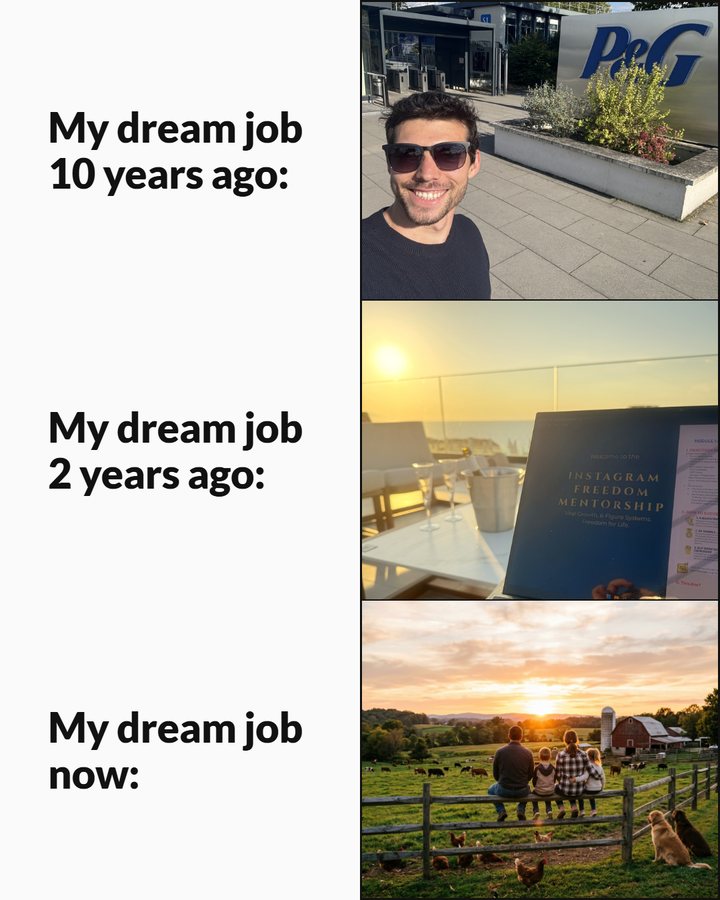
I'm Jean-Marc! I spent 10 years running plants and supply chains with Procter & Gamble. But that was until I scaled my Instagram Media Network to 2M+ followers in 2 years and quit that job!
Now I build GTM systems that help B2B companies get more leads without hiring. Here's the engine I built to post up to 35 times a week across channels and accounts.
- 35 posts a week, across channels
- 2M+ Instagram followers in 2 years
- 10 yrs running plants and supply chains at P&G
What you are building
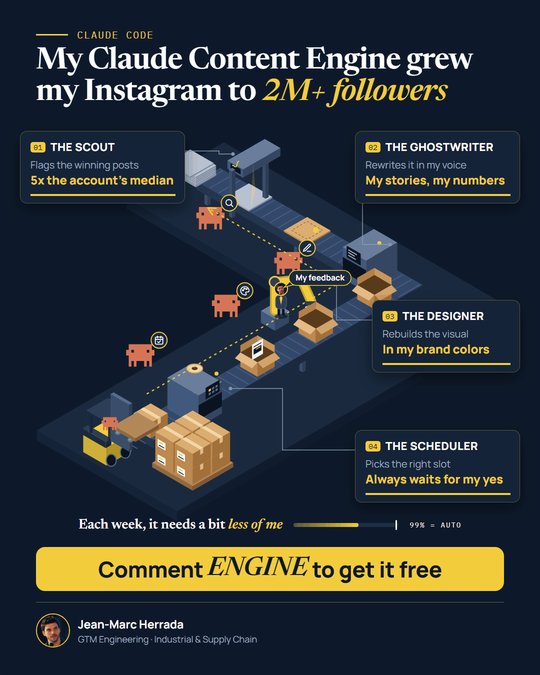
One Google Sheet, one voice file, one Drive folder per post, and a Buffer account. A post moves through four skills. You validate each job yourself the first two weeks.
 The ScoutYou add the profiles you watch. A post is flagged only when its score is more than 3 times that account's own median, and the score itself is at least 50.
 The GhostwriterThe model writes one column. You write the final column. The calendar reads only the final column.
 The DesignerYou rebuild the visual in your colors.
 The SchedulerIt sends the final column, unchanged. LinkedIn can go out on its own after you have said yes. Instagram pings your phone, and you publish that one yourself.
What you need
Six tools. Four of them have a free plan that is enough to start. No code.
 ClaudeWrites, checks the math, interviews you. A paid plan.
 Google SheetsThe brain: every post, every decision, every caption.
 Google DriveOne folder per post, with the originals and your visual.
 LinkedInWhere it goes live. Instagram works the same way.
Make the sheet
Create one Google Sheet. Three tabs, with these headers in row 1, in this order. Later steps find a column by its header. If you insert a column, the header still has to say the same words.
| Header | Who fills it |
|---|---|
| Platform | You. LinkedIn for this line. |
| URL | You. The profile link. This is the only cell you must fill to start a creator. |
| Date of Checking | The date you last counted their posts. |
| Followers | The count on that date. |
| Daily Average Followers Growth | Leave blank until you have two follower counts. |
| Update Notes | Your notes. Nothing else writes over them. |
Creators| Header | Who fills it |
|---|---|
| # | A number you assign once. |
| Decision | AGREE or DISAGREE, then a dash, then why. You write this after you have looked at the flag. |
| Category | The type of day it can fill. Use the same words as the Type column on the calendar. |
| Date Found | The day you flagged it. |
| Post Date | The day they published it. |
| Post Link | The URL of their post. |
| Summary | The multiple, the score, and the median, then one to three sentences. The shape is: 4.0x (200 vs median 50). |
| Good Candidate | Yes or No. Only a Yes gets a folder and a rewrite. No means you are done with that row. |
| Reason | Why Yes or No, in 30 words or less. Not a retelling of their post. |
| Format | One of: Text only, Image, Multi-image, GIF, Carousel (PDF), Video, Poll, Article / Link, Quote post, Event, Newsletter. |
| Outlier Score | 0 to 100. Step 4 determines the flag. The rest of the score is fit and freshness. The flag does not wait for a pretty score. |
| Folder Name | account, a space, a hyphen, a space, then a topic in 3 or 4 words. The calendar has to match this text exactly. |
| Media Folder | The Drive link of that post's folder. |
| Original Caption | Their caption, pasted. You do not edit it. |
| AI Rewritten Caption | The model only. You do not write this cell. |
| Final Rewritten Caption | You only. This is the caption that can go live. |
OutliersOne row per post you might rewrite| Header | Who fills it |
|---|---|
| Date | Pre-filled. |
| Time | Pre-filled. Needed if you post several times a day. |
| Title | The Folder Name, copied exactly. This is the lookup key. |
| Media Location | A VLOOKUP formula. It finds Media Folder on the row whose Folder Name equals Title. |
| Caption | A VLOOKUP formula. It finds Final Rewritten Caption on that same row. Never AI Rewritten Caption. |
CalendarOne row per postWrite the voice file
A second Google Doc, not a tab. The rewrite is allowed to use a fact only when it is in this Doc. If it is not there, the draft writes [ASK ME] and leaves the fact out.
Paste this into a new Claude chat. Answer one question at a time. When it writes the file, delete every line you did not say.
You are interviewing me so a later chat can write posts in my voice.
Ask ONE question, then wait. Do not write a post.
Questions, in order:
1. Who do I write for, and what do they already know?
2. What have I done with my own hands that they have not? I will give a number only where I can point to it.
3. Three stories I have already told out loud. Ask for the year, the place, and what changed.
4. Words I use. Words I never want in a post.
5. A post of mine I would still sign, and one I would not.
6. One belief my reader might argue with.
7. What I will not claim.
Then write a Doc with these headings only: Facts, Stories, Beliefs, Voice, Never.
A vague answer becomes [ASK ME], not a clean sentence I did not say.
Under a heading called Samples, paste 20 posts you published and would still sign. When you later change a draft, the copywriter looks at differences and defines rules: what you changed, and why. The next rewrite reads those rules first.
Add the creators
- Pick 15 to 30 profiles whose readers you want. One niche. Skip accounts you follow only because they are famous.
- Put each profile link in the URL.
- Connect to Apify to retrieve the number of followers for each.
Score one account by hand
Connect to Apify scrapers for your reference creators channel. For each post, scrape reactions, comments, and reposts.
You are checking my arithmetic. Do not write a post.
Engagement score = reactions + 2 x comments + 3 x reposts.
Median = the middle score of the other posts I list. If the count is even, average the two middle scores. Do not include the post I mark JUDGED.
Multiple = judged score / median.
Flag only when the multiple is over 3 AND the score is at least 50.
I will paste the rows. Return the score, the sorted list, the median, the multiple to one decimal, and Flag or No flag.
If your median and mine differ, show the sort and stop.
Open one outlier row
Only for a post Step 4 flagged.
- Fill #, Date Found, Post Date, Post Link, Summary, Format.
- Read the post. Good Candidate is Yes only if you could post this topic on your profile without pretending a result you do not have. Reason says why, in 30 words, and does not describe their post.
- Decision is AGREE or DISAGREE, then why. If you disagree, change Good Candidate to what you think it should be. The Yes or No is the outcome. The note is not.
- A Yes gets a Drive folder named TBD - then the Folder Name. Put their images in a subfolder called Originals. Paste the folder link in Media Folder. Paste their caption in Original Caption and do not clean it up.
- A No gets no folder. Leave AI Rewritten Caption and Final Rewritten Caption empty.
Rewrite into the two caption columns
New Claude chat. Paste the voice file, including Rules and Samples. Then paste this. Then paste Original Caption and the three things you kept.
You are writing one LinkedIn caption. You may write into AI Rewritten Caption and nowhere else.
Read my voice file before you write. A fact, number, client, or story that is not in it is [ASK ME], and it stays out of the caption.
Keep the job and the structure I give you. Do not keep their sentences, their analogy, or their numbers.
One idea. American English.
The first line fits on one phone line and makes sense alone. The point sits in the first three lines. Then a blank line.
No hashtags. No "Agree?". No em dash.
Bold at most two short spans, written as **like this**. Bold only letters and digits. Do not bold a tag or a hashtag.
The whole caption stays under 3,000 characters. A bold letter counts as 2.
After the caption, list each fact and the heading in my voice file it came from.
Paste the caption it returns into AI Rewritten Caption. Do not paste it into Final, and do not paste it into the calendar.
Then you edit. The text you would actually post goes in Final Rewritten Caption. If you change a sentence, add the rule to the voice file the same day.
I built a Claude team that runs my LinkedIn.
4 agents, 5 posts a week, and nothing goes live without my yes.
Writing a post with AI is easy.
Making it sound like you, every single week, is the hard part.
So I built it like a production line (10 years at P&G leave a mark 😅):
🔎 THE SCOUT
Every day, it checks the creators I track and flags the posts doing way better than their usual.
✍️ THE GHOSTWRITER
Rewrites the winner with MY stories and MY numbers. Only facts I approved. Never invented ones.
🎨 THE DESIGNER
Rebuilds the visual in my own brand colours.
📅 THE SCHEDULER
Puts the approved post in the right slot.
Before anything gets scheduled, there's one quality gate: me.
I edit the caption in a Google Sheet.
And here's my favourite part:
next time, the Ghostwriter compares its version with mine and turns my edits into rules.
Each week, it needs a bit less of me 😉
Fancy kids call that "human in the loop".
In a plant, we just called it quality control.
➡️➡️ What would you improve?
My Claude Content Engine grew my Instagram to 2M+ Followers in 2 years.
Now it runs my LinkedIn and I'm giving it away for free!
Writing a bad post with AI is easy.
Making it good and sound like you is harder.
Staying consistent is where 99% end up failing.
So I built my Claude Content Engine like a production line (10 years at P&G plants leave a mark 😅):
>> Continuously improving.
>> Needs to run 24/7.
>> Ensuring quality.
4 agents, and nothing goes live without my yes.
🔎 THE SCOUT
It checks the creators I track and flags the posts getting an engagement 5x higher than the account's 14-day rolling median.
✍️ THE GHOSTWRITER
Rewrites the winner with MY stories and MY numbers. Never invented ones.
It literally interviewed me and I fed it content I wrote myself.
🎨 THE DESIGNER
Rebuilds the visual in my own brand colours.
📅 THE SCHEDULER
Puts the approved post in the right slot.
When launching the system, I give my feedback between every agent so it improves.
Once I agree with 99% of its decisions, agents switch to auto-mode (except the scheduler).
Each week, it needs a bit less of me 😉
Wanna grow Content as an Acquisition channel?
Giving away for free 👇👇
Same skeleton, same four agents. My version leads with the result, says why it matters to the reader, and ends on the offer. Each of those edits became a rule for the next draft.
A correction that stays in the chat is lost.
| Check | Pass |
|---|---|
| Facts | Every number points at a line in the voice file. |
| Not a copy | No six words in a row from Original Caption. |
| One job | You can say what the reader does after reading, in one line. |
| Opening | Line 1 stands alone. The point is inside the first three lines. |
| Length | Under 3,000 characters, and at most two bold spans. |
Build the image in the folder
The caption is frozen at Final Rewritten Caption. The image does not get a vote on the words.
- Size 1080 by 1350. Same size on every slide of a carousel.
- Set the letters yourself in Canva, Google Slides, or whatever you already use. Do not ask an image model to draw the words. You cannot fix one word without regenerating the picture.
- Two colors, yours. One label, one headline taken from the caption, one takeaway, your name. Body text you can read on your phone without pinching.
- A person who has not read the caption gets the point in one second. If they cannot, cut words. The caption holds the rest.
- If a number is not yours, the image says whose it is.
- Export into the post's Drive folder, next to Originals, not inside it. The link in Media Folder stays the link of the folder.
- Format on the Outliers row has to match the file. Text only means there is no file. An empty folder with any other Format is not ready to send. An auto-published caption without its image cannot be taken back.
You are writing a build brief. Do not generate an image. Do not change the caption I paste.
Return:
- the one-second point
- the headline, copied from the caption
- at most six other words that may appear on the image
- what must stay off the image: their name, a number that is not in the caption, a second idea
I will typeset it at 1080 by 1350 in my own colors:
[background hex]
[accent hex]
[name]
Put the row on the calendar
- Pick a day whose Type matches the row's Category.
- Time is HH:MM. Write the one you want.
- Title is the Folder Name, character for character.
- Check Media Location. It must be the Drive folder from Step 5. If it is blank, Title does not match Folder Name.
- Check Caption. It must be Final Rewritten Caption, not AI Rewritten Caption. Read both cells side by side if you are unsure.
- Share the Drive folder as anyone with the link, viewer. Buffer stores the link. It does not store a copy of the file. If you lock the folder later, the scheduled post loses its image.
Connect Buffer and create the key
Buffer is the sender. The model is not. The caption never goes through a chat on the way out.
The cell goes out.
- Create a Buffer account. Connect the LinkedIn profile you will post on. Connect Instagram only if you are running that second line. Ask yourself which channel you are sending before every batch. I ask it even when I think I know.
- In Buffer, open the channel, then Settings, then Posting Schedule, and set the slots there. The API cannot edit those slots. If a Buffer slot sits within 30 minutes of the Time in your sheet, the post uses the Buffer slot. Otherwise it uses the Time you typed.
- Create the API key at publish.buffer.com/settings/api.
- Store it as
BUFFER_API_KEYin a secrets file on your machine, or as an environment variable. Never paste the key into a chat. Never put it in the Sheet. Never commit it. - A script that sends is allowed only if it reads the Caption cell and does not ask a model to rewrite it. Until you have that, you paste the Caption cell into Buffer yourself.
- The first send is a draft. In Buffer open the channel, then Drafts. Compare the draft with Final Rewritten Caption. Any different word means the draft is wrong. Delete it. Fix the cell, then draft again.
- After the draft matches, schedule it. LinkedIn is automatic: Buffer publishes it at the slot. Instagram is a notification: Buffer pings your phone and you publish it yourself. A ping is not proof the Instagram post is live. Go and look.
Send the first one while you watch
One post. You between each step. Do not queue the week.
- Step 4 on one creator. Your median, checked by hand.
- Step 5. Good Candidate Yes, folder, Original Caption untouched.
- Step 6. AI Rewritten Caption from the model. Final Rewritten Caption from you. The five checks pass.
- Step 7. The image is in the folder. You can read it on your phone.
- Step 8. Title matches. Caption is the Final cell. The folder is shared.
- Step 9. Draft in Buffer. You read it. Then you schedule that one post.
Open the live post when the slot has passed. LinkedIn should be the words you approved. Instagram is live only after you tapped publish.
Keep a log of 20 decisions: unchanged, edited, or rejected, and the rule you added. I let an agent run with less of me only when 19 of the last 20 on that agent were unchanged. The send never joins that list. Buffer does not get a standing yes.
What a send must refuse
| What you see | What you do |
|---|---|
| Caption is empty | Final Rewritten Caption is empty, or the Title does not match Folder Name. Do not type a caption into Buffer to skip the cell. |
| Time is empty or not HH:MM | Fix the cell. Do not let Buffer pick a time for you. |
| The folder is not shared | Anyone with the link, viewer. Then draft again. |
| LinkedIn folder has no image, and Format is not Text only | Wait until the export is in the folder. Do not send the caption alone. |
| Instagram has more than 10 slides | The extra slides stay in Drive. Do not send 11. |
| A Buffer post already sits within an hour of this one | Do not send a second. Look at the one that is already there. |
| The key is missing | Step 9. Create it. Put it in the secrets file. Do not paste it here. |
| Buffer says you are at 10 scheduled posts | Stop. Choose what to remove. Do not delete in a hurry. |
| The live caption is not the Final cell | The sender rewrote, or you edited inside Buffer. The cell wins. Fix the path that changed the words. |
The next post
- Add this week's posts to the scratch scores. Same formula. Posts younger than 24 hours wait.
- Flag only over 3x and a score of at least 50. You pick the one Yes.
- Rewrite into AI Rewritten Caption with the voice file, including every rule so far. You write Final.
- Image in the folder. Phone check.
- Calendar row. Title exact. Caption is the formula, still pointing at Final.
- Draft in Buffer. Compare it. Then schedule.
- Write the log line the same day.
That is the line. The sheet decides the words and the time. Buffer sends those words.
You are the yes in between.
Want this engine running on your accounts, in your voice, without building it yourself? Message me and I'll set it up with you.
Talk to me →